Blank Page to MCQ Test: Learning Central’s AI-Powered Starting Point
7 October 2025

This blog is written by Michael Hackman, a Learning Designer at the Learning and Teaching Academy.
About Me
Hi, I’m a member of the Digital Education Team based at the Learning and Teaching Academy. You may have met me during a module design or student engagement workshop. If we haven’t met yet, feel free to get in touch for support with any part of your teaching design or delivery.
The Task
As part of my role, I often help staff to create multiple choice question (MCQ) tests for formative and summative testing of student knowledge. Writing MCQs that effectively measure student understanding can be deceptively difficult and time-consuming, so I was very excited when AI generated MCQ tests were enabled in Learning Central. Following the Digital Education Team’s blog series of putting AI to the test, I used the new tool to generate an MCQ test for my students.
Creating the MCQ Test
The process was straightforward: I created a new test, selected “Auto-generate question”, then input the learning outcomes as a description and selected the resources the tool could use to generate the content. I hadn’t even finished my coffee, and it had generated a ten question MCQ test!
Analysis
The big win was how effectively I went from a blank page to having a test based on the content and learning outcomes of my existing lesson. Whilst the questions required some editing, the task felt much easier and quicker than having to start from scratch.
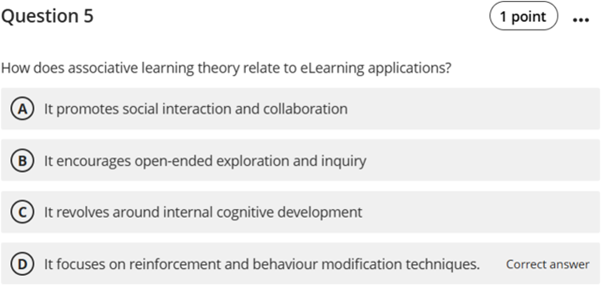
The questions generated weren’t quite perfect and still required a human touch to ensure the test was engaging and effectively measured student understanding. For example, Question 5 (screenshot below) tests the application of associative learning theory to eLearning applications, a learning outcome for the lesson. The correct answer was theoretically correct, but did not mention eLearning applications, which could confuse students and cause them to lose marks. Such experiences are proven to reduce student engagement and enjoyment with their course.
Thankfully, the editing tool is intuitive to use, and it took no time at all to edit the answer to ensure students can have a positive experience with the question.
The Human Touch is Still Key
Overall, the AI tool is an excellent way to reduce the time and brainpower needed to create an MCQ test. As with all AI tools, we need to ensure we proofread the output before opening it up to students.
I will definitely be using the AI tool to help me create formative MCQ tests in future. But my AI prompting skills are going to need some work before I’d be confident to use it for a summative test.
Give it a go
Have a go at creating your own Multiple Choice Question test using the Auto Generate Tool.
If you have any helpful tricks or tips when using Learning Central, please do get in touch with the Learning and Teaching Academy: [email protected]